The best email signature software in 2026: 14 tools ranked and compared.
Rankings, feature tables and real prices for teams of 10 and 50, covering AI, animation, analytics, deployment and deliverability.
14
Tools Compared
6
Criteria Scored
8
Tools With AI
1
Filters Bot Clicks
Using ChatGPT or Claude? Take this comparison with you.
The short answer
For teams that want their email signatures to drive clicks, Sigmail ranks first with 4.6 out of 5: it builds signatures with AI from your website, animates logos and photos, tracks clicks with bot filtering, serves your links from your own domain, and costs a flat $4 a month for the whole team. For IT-led companies that need automatic server-side deployment and certifications, choose Exclaimer (Microsoft 365 and Google Workspace) or CodeTwo (Microsoft 365 only, lowest price). WiseStamp is the strongest all-rounder if you need both.
Last updated 14 November 2026. Prices are list prices checked on each vendor's site that day.
Quick picks.

Best for marketing
Sigmail
AI, animation, click analytics with bot filtering and your own domain for links, from $4 a month for the whole team.
Create your signatureBest for AI
Sigmail
Type your website and get a finished signature with designed banners. WiseStamp's AI Designer is the runner-up.
Create your signature
Best for big IT teams
Exclaimer

Server-side or client-side on Microsoft 365 and Google Workspace, with the strongest certifications.
Visit ExclaimerBest for CRM targeting
Opensense

Banners targeted by CRM stage, if you can meet the $500 a month minimum.
Visit OpensenseBest free option
Signitic

Free for up to 19 people. Sigmail's free plan suits a single signature.
Visit SigniticThe ranking.
Each tool is scored out of 5 on six things, then weighted for teams that use email signatures for marketing: design and animation 20%, marketing and analytics 20%, AI 20%, deliverability and tracking 15%, value 15%, and deployment and IT 10%. If you're an IT team, give deployment more weight and the server-side tools move up.
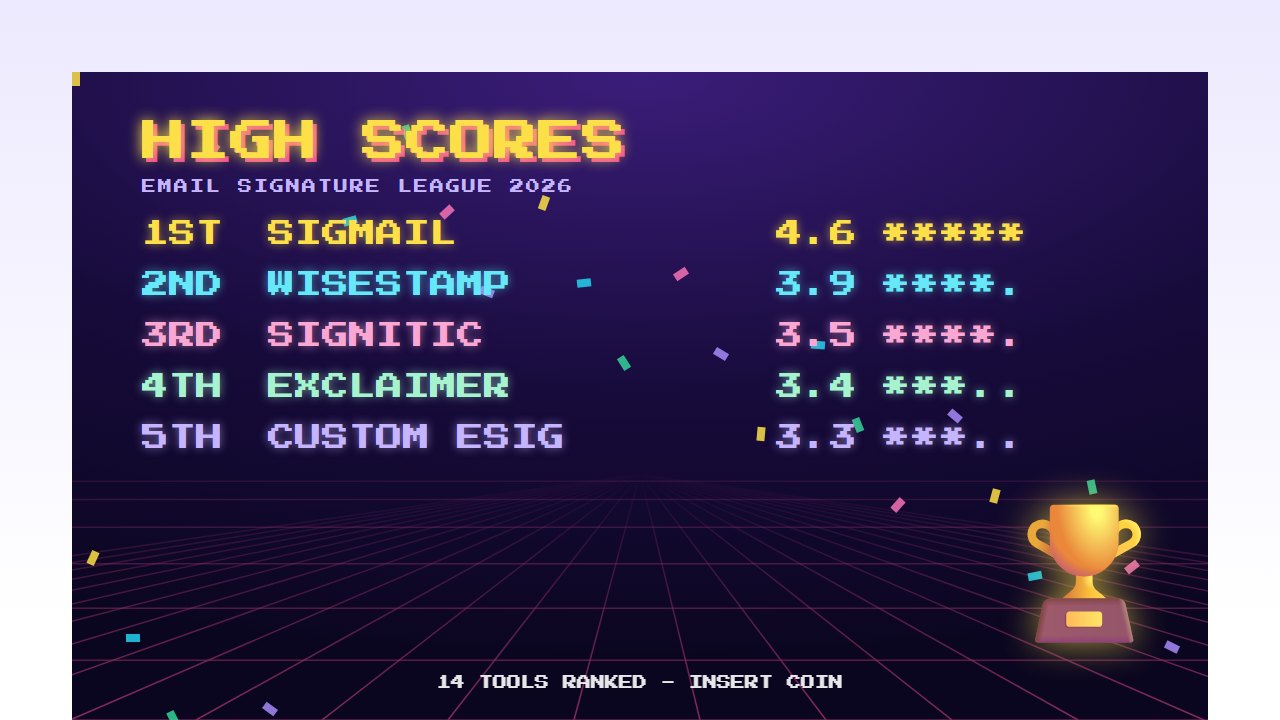
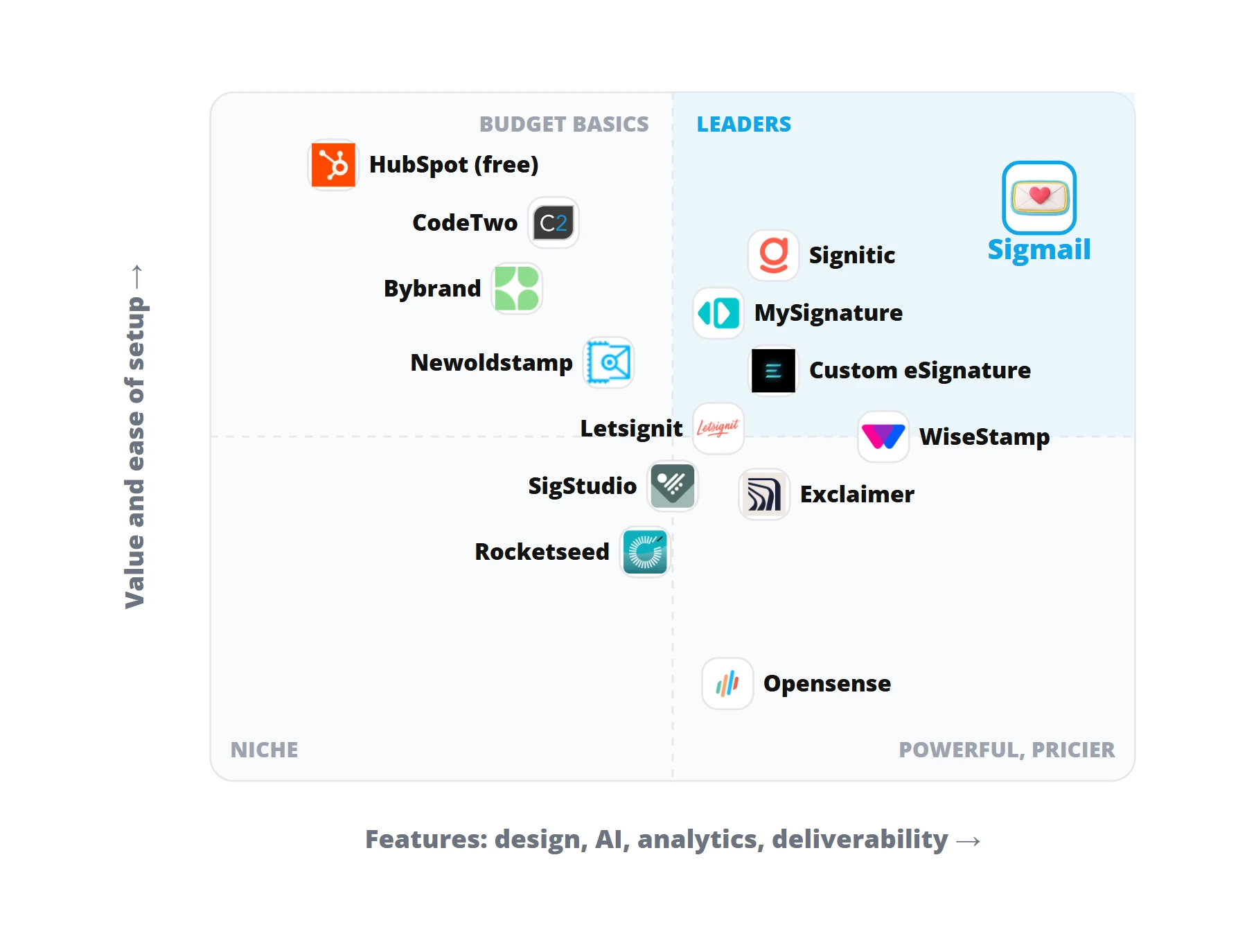
Sigmail leads on design, AI, tracking and price, and loses points only on deployment. WiseStamp is the strongest all-rounder, and Exclaimer, Rocketseed and CodeTwo top the list for IT-led deployment.
Email signature software ranked
Scores out of 5, weighted for marketing teams.
| Tool | Overall | Design and animation | Marketing and analytics | AI | Deliverability and tracking | Value | Deployment and IT |
|---|---|---|---|---|---|---|---|
| 1Sigmail | 4.6 | 5.0 | 4.5 | 5.0 | 5.0 | 5.0 | 2.0 |
| 2WiseStamp | 3.9 | 4.0 | 4.5 | 4.0 | 3.5 | 3.0 | 4.5 |
| 3Signitic | 3.5 | 3.0 | 4.0 | 3.0 | 3.5 | 4.5 | 3.5 |
| 4Exclaimer | 3.4 | 3.0 | 4.0 | 2.5 | 3.5 | 3.0 | 5.0 |
| 5Custom eSignature | 3.3 | 4.0 | 3.0 | 3.0 | 3.5 | 3.5 | 3.0 |
| 6MySignature | 3.2 | 3.5 | 3.0 | 2.5 | 3.5 | 4.0 | 3.0 |
| 7Letsignit | 3.2 | 3.0 | 4.0 | 2.0 | 3.5 | 3.0 | 4.0 |
| 8SigStudio | 3.1 | 4.0 | 2.5 | 3.0 | 2.5 | 3.0 | 4.0 |
| 9Opensense | 3.0 | 3.0 | 5.0 | 1.0 | 3.5 | 1.5 | 4.5 |
| 10Rocketseed | 3.0 | 3.0 | 4.5 | 0.0 | 3.5 | 3.0 | 5.0 |
| 11Newoldstamp | 2.9 | 3.0 | 4.0 | 0.0 | 3.0 | 4.0 | 4.0 |
| 12CodeTwo | 2.8 | 3.0 | 2.5 | 0.0 | 3.0 | 5.0 | 4.5 |
| 13Bybrand | 2.5 | 3.0 | 2.5 | 0.0 | 2.5 | 4.5 | 3.5 |
| 14HubSpot (free) | 1.5 | 2.0 | 0.5 | 0.0 | 1.5 | 5.0 | 0.5 |


Feature comparison.
The table scrolls sideways. "Not stated" means we couldn't find it on the vendor's own site, not that it's missing.
Email signature software features compared
| Feature | Sigmail | WiseStamp | Signitic | Exclaimer | Custom eSignature | MySignature | Letsignit | SigStudio | Opensense | Rocketseed | Newoldstamp | CodeTwo | Bybrand | HubSpot (free) |
|---|---|---|---|---|---|---|---|---|---|---|---|---|---|---|
| AI | website to signature, AI-designed banners | AI Signature Designer (May 2026) | AI features on every plan | Signature Converter (screenshot to template, US only, Nov 2026) | AI signatures, AI logo animation | Improve with AI (colours and layout) | AI assistant reviews banners | Paid AI credits (templates, logos, photos) | Not on its site | says it doesn't use AI | ||||
| Animated logos and GIFs | Animated logos, 20 photo animations | Animated GIF signature maker | GIFs (warns about Outlook) | GIFs supported | AI logo animation, animated profile, interactive icons | GIF guides | Not stated | Not stated | GIFs supported | Animations mentioned | GIF upload | GIFs supported | Not stated | |
| Banners | ||||||||||||||
| Scheduled campaigns | Standard | Standard and Pro | Not stated | Not stated | Not stated | |||||||||
| A/B tests | Standard | Pro | Not stated | Not stated | Pipeline plan and up | Not stated | ||||||||
| Click analytics | Paid plans, per link and person | Grow plan and up | Every plan | Pro only | Pro plan | Professional and up | UTM tags only | Complete plan, tracking add-ons | UTM tags only | Mostly UTM tags | ||||
| Bot-click filtering | Not stated | Not stated | Not stated | Not stated | Not stated | Not stated | n/a | Not stated | Not stated | Not stated | n/a | Not stated | n/a | |
| Custom domain | Business Pro and Agency | Not stated | Not stated | Not stated | Not stated | Not stated | Not stated | Not stated | Not stated | Not stated | Not stated | Not stated | Not stated | |
| Microsoft 365 | Manual mail flow rule | Outlook add-in | server-side | Outlook sync | Teams plan | Add-in, optional connector | transport rule | server-side | server-side | |||||
| Google Workspace | Copy-paste | Gmail app | Gmail sync | Teams plan | Gmail API | server-side | ||||||||
| Outlook add-in | Not stated | Not stated | Not needed | Not stated | Not stated | |||||||||
| CRM | Salesforce, HubSpot, Dynamics, more | HubSpot, Salesforce | HubSpot, Salesforce (Pro) | Says it works with all CRMs | Not stated | Salesforce, HubSpot | 60+ apps | HubSpot, Salesforce, Marketo, Outreach | Salesforce, HubSpot | HubSpot, Salesforce, Pipedrive | Zoho, Freshdesk | HubSpot CRM | ||
| Disclaimers | Not stated | Not stated | Not stated |
Pricing compared.
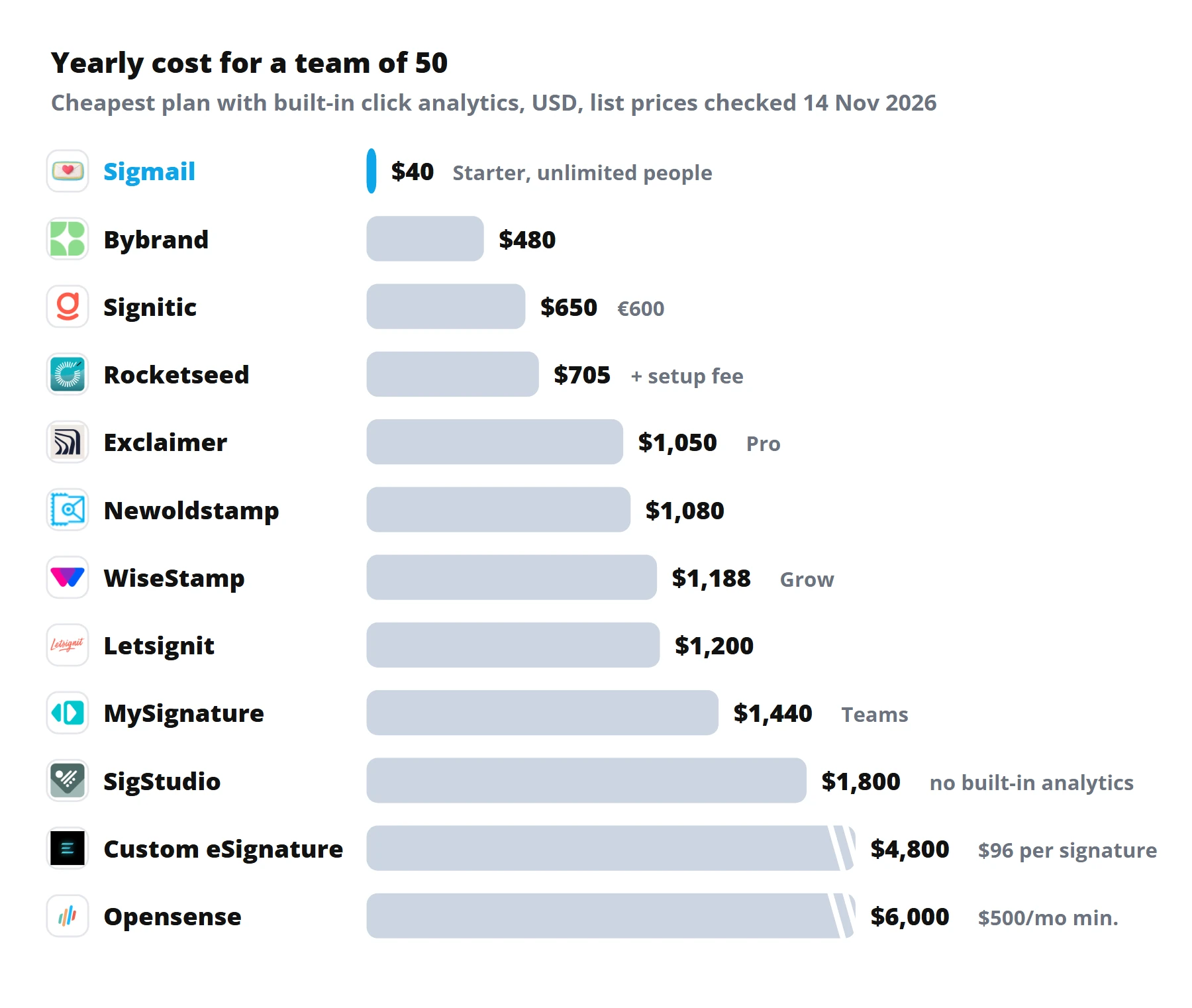
Per-user pricing looks cheap until you multiply it. Below are list prices, plus our estimate of the yearly cost for 10 and 50 people on the cheapest plan that includes click analytics (or the cheapest plan, where a tool has no built-in analytics).
What a team really pays
Cheapest plan with built-in click analytics, per year. Sorted cheapest first.
| Tool | 50 people a year | 10 people a year | Starts at | Free plan | How you pay |
|---|---|---|---|---|---|
| Sigmail | $40 | $40 | $4/mo | 1 signature, no click tracking | Flat price for your whole team |
| Bybrand | $480 | $96 | $8/mo for 10 | Base fee + per signature | |
| Signitic | €600 | €0 | Free, then €1/person/mo | up to 19 users | Per person, free up to 19 |
| Rocketseed | $705 | $705 | $705/yr | Flat by headcount, 50 minimum | |
| CodeTwo | $732 or less | $146 | $1.22/person/mo | Per person, 10 minimum | |
| Exclaimer | $1,050 | $210 | $0.90/person/mo | Per person, 10 minimum | |
| Newoldstamp | about $1,080 | $219 | $1.80/signature/mo | free generator | Per signature, 5 minimum |
| WiseStamp | $1,188 | $708 | $9/mo +$2/person | Base fee + per person | |
| Letsignit | $1,200 | $240 | $2/person/mo | Per person | |
| MySignature | $1,440 | $288 | Free, then $2.40/person/mo | 1 signature | Per person |
| SigStudio | $1,800 | $900 | $75/mo for 25 | Per signature | |
| Custom eSignature | about $4,800 | $960 | Free, then $96/yr each | watermark, no analytics | Per signature |
| Opensense | $6,000 | $6,000 | $1/person/mo | free generator only | Per person, $500/mo minimum |
HubSpot's generator is free but has no team features or analytics. Minimums, trials and setup fees are in each tool's card below.
AI in email signature software.
AI arrived in email signatures in 2026, and it means very different things from tool to tool. Some tools tidy a design you've already made. Sigmail builds the whole signature from your website: it finds your logo and animates it, picks up your colours and links, searches for something current to promote and designs banners for it. See how it works.
AI features compared
Animated logos and GIFs.
Most tools accept a GIF you've made yourself. Only a few make animation easy: Sigmail animates your logo for you (and the AI builder adds a fade-in automatically), with 20 animated photo shapes. Custom eSignature specialises in interactive, animated signatures, and WiseStamp has a GIF signature maker. Whichever you use, remember that classic Outlook up to 2019 shows only the first frame. Our size guide covers GIF sizes and what older Outlook shows.
Deliverability and click tracking.
A signature rarely decides whether an email lands in the inbox. Sender reputation and authentication do. What matters for the signature is hosted images (not attachments), a sensible size, links that work, and, for server-side tools, SPF and DKIM set up correctly because they change how mail is routed. Where images and tracked links are served from matters too: your own domain keeps them on-brand and tied to your own reputation, instead of a tracking domain shared with every other customer. Sigmail lets Business Pro and Agency plans use their own domain for signature images and links; none of the other tools documents this.
Click tracking is where tools differ most. Email security scanners such as Microsoft Safe Links open every link in an email before people do, so raw click counts are mostly bots. In our data only 18% of recorded signature clicks were people. None of the other 13 tools documents bot or scanner filtering. Here's how ours works.
Deliverability and tracking compared
| Feature | Sigmail | WiseStamp | Signitic | Exclaimer | Custom eSignature | MySignature | Letsignit | SigStudio | Opensense | Rocketseed | Newoldstamp | CodeTwo | Bybrand | HubSpot (free) |
|---|---|---|---|---|---|---|---|---|---|---|---|---|---|---|
| Approach | Hosted images on your own domain, plain-text version | Hosted images; SPF guidance for server-side | Signature size limit enforced | Server-side routing option | Animations hosted on its servers; no tracking pixels | Published tests (Jul 2026) | Connector supports DKIM | Not stated | Server-side option | Server-side routing | Not stated | Server-side, shows in Sent Items | Not stated | Advice only |
| Custom domain for images and links | Business Pro and Agency | Not stated | Not stated | Not stated | Not stated | Not stated | Not stated | Not stated | Not stated | Not stated | Not stated | Not stated | Not stated | |
| Click analytics | Paid plans, per link and person | Grow plan and up | Every plan | Pro only | Pro plan | Professional and up | UTM tags only | Complete plan, tracking add-ons | UTM tags only | Mostly UTM tags | ||||
| Bot-click filtering | Not stated | Not stated | Not stated | Not stated | Not stated | Not stated | n/a | Not stated | Not stated | Not stated | n/a | Not stated | n/a |
Each tool, in brief.
Sigmail
Best for teams that want every email to drive clicks, with AI, animation and real analytics.
4.6 / 5
Price Free; Starter $4/mo; Business Pro $9/mo; Agency $49/mo
Minimum NoneTrial Free plan
What we like
- AI builds a finished signature and banners from your website
- Animated logos, 20 animated photo shapes, click analytics with bot filtering on every paid plan
- Your own domain for signature images and links (Business Pro and Agency)
Watch out for
- No automatic Microsoft 365 or Google Workspace deployment yet (copy-paste, plus a manual Microsoft 365 rule)
- No disclaimers, scheduled banners or A/B tests yet
Create your signature G2 Not listedWiseStamp
Best for mid-size teams that want campaigns, CRM targeting and AI design in one tool.
3.9 / 5
Price Pro+ $9/mo +$2/member; Basic $19/mo, Grow $49/mo, Platform $189/mo, each +$1/employee
Minimum None statedTrial 14 days
What we like
- AI Signature Designer on every plan (prompt, screenshot or logo)
- Campaigns, A/B tests and deep CRM integrations
Watch out for
- Analytics and campaigns need the $49/mo Grow plan
- Annual billing only
Visit WiseStamp G2 4.6 (about 570)Signitic
Best for budget-minded European teams that want campaigns and analytics.
3.5 / 5
Price Free up to 19 users; Standard €1/user/mo
Minimum Standard: 20 usersTrial Free plan
What we like
- Free plan for up to 19 people
- Campaigns, A/B tests and analytics on Standard
Watch out for
- Appears to be client-side only
- Free plan keeps statistics for 7 days
Visit Signitic G2 4.6 (171)Exclaimer
Best for mid-market and enterprise IT teams on Microsoft 365 or Google Workspace.
3.4 / 5
Price Starter $0.90, Standard $1.45, Pro $1.75 per user/mo
Minimum 10 usersTrial 14 days
What we like
- Server-side and client-side deployment on Microsoft 365 and Google Workspace
- ISO 27001, ISO 27018 and SOC 2 Type II
Watch out for
- Analytics, A/B tests and CRM only on Pro
- 10-user minimum
Visit Exclaimer G2 4.5 (about 1,300)Custom eSignature
Best for individuals and small teams who want interactive, animated signatures.
3.3 / 5
Price Free (with watermark); Pro $96/yr per signature; Enterprise (100+) on quote
Minimum NoneTrial 7 days
What we like
- Interactive signatures with AI logo animation, animated profile photos and icons
- Animations served from its servers, keeping emails light
Watch out for
- Priced per signature, so it gets expensive for teams
- Signatures depend on its hosting, so cancelling ends the animation
Visit Custom eSignature G2 5.0 (17)MySignature
Best for solo users and small teams on a budget.
3.2 / 5
Price Free; Professional from $6/user/mo; Teams from $2.40/user/mo
Minimum Teams: 5Trial Free plan
What we like
- Free plan and a simple editor
- Published its own deliverability tests
Watch out for
- Link tracking reportedly Gmail-only
- Prices differ across its own pages
Visit MySignature G2 4.7 (about 180)Letsignit
Best for outlook-centric companies that want campaigns built in.
3.2 / 5
Price $2/user/mo per module; Enterprise on quote
Minimum Not statedTrial Yes
What we like
- Microsoft-certified Outlook add-in
- Campaigns with scheduling, randomising and A/B tests
Watch out for
- Highest per-user price of the per-seat tools
- Server-side only through an optional connector
Visit Letsignit G2 4.5 (about 220)SigStudio (Email Signature Rescue)
Best for designers and MSPs managing many client brands.
3.1 / 5
Price Team $75/mo for 25 signatures ($3 each)
Minimum 5 signaturesTrial 30 days for $1
What we like
- Outlook add-in plus installers for every email app
- MSP workspaces and wholesale pricing
Watch out for
- No built-in analytics (Google Analytics tags only)
- AI is a paid add-on
Visit SigStudio G2 4.7 (27)Opensense
Best for revenue teams that want account-based banners and pipeline attribution.
3.0 / 5
Price Signatures $1, $3 or $5 per user/mo; tracking plans $20 to $65 per user/mo
Minimum $500/mo spendTrial On request
What we like
- CRM-targeted, account-based banners
- Engagement data written back to your CRM
Watch out for
- $500 a month minimum spend
- Tracking costs extra per user
Visit Opensense G2 4.7 (about 370)Rocketseed
Best for 50 to 200 person firms that want server-side deployment on every platform.
3.0 / 5
Price 50 staff $705/yr; 100 staff $1,320/yr; 200 staff $2,445/yr
Minimum 50 employeesTrial 14 days
What we like
- Server-side on Microsoft 365, Google Workspace and Exchange
- All features at every size, 24/7 support
Watch out for
- 50-person minimum and a setup fee
- No AI
Visit Rocketseed G2 4.6 (51)Newoldstamp
Best for marketing-led teams that want banners and scheduling at a per-signature price.
2.9 / 5
Price $1.80 per signature/mo
Minimum 5 signaturesTrial 7 days
What we like
- Scheduled banner campaigns per department
- One-click deployment to Google Workspace and Microsoft 365
Watch out for
- No AI
- Trial signatures can't go live
Visit Newoldstamp G2 4.7 (435)CodeTwo
Best for microsoft-only organisations that want the cheapest mature server-side option.
2.8 / 5
Price From $1.22/user/mo (10 to 25 users, yearly) down to $0.73 at 500
Minimum 10 licencesTrial 14 days
What we like
- Low price with every feature included
- Signatures show in Sent Items, plus an Outlook web add-in
Watch out for
- Microsoft 365 only, no Google Workspace
- No built-in click analytics (UTM tags only)
Visit CodeTwo G2 4.8 (about 1,770)Bybrand
Best for google Workspace teams that want cheap monthly billing.
2.5 / 5
Price $8/mo for 10 signatures, +$0.80 per extra
Minimum None statedTrial 14 days
What we like
- Low monthly price
- Google Workspace app and directory updates
Watch out for
- Thin marketing and analytics
- No AI
Visit Bybrand G2 4.9 on Capterra (111)HubSpot Email Signature Generator
Best for one person who needs a free signature in two minutes.
1.5 / 5
Price Free
Minimum NoneTrial n/a
What we like
- Free, no account needed
- Quick and simple
Watch out for
- No analytics, banners or team management
- Copy-paste only, one person at a time
Visit HubSpot (free) G2 Not listed
How to choose.
- If your goal is clicks and pipeline, pick a marketing-led tool with banners, per-link analytics and bot filtering. Count clicks from people, not raw clicks.
- If IT must control every signature on every device, pick a server-side tool (Exclaimer, CodeTwo, Rocketseed) and budget per user.
- If you need both, WiseStamp or Opensense cover more ground, at a higher price.
- If you're one person, start with a free plan (Sigmail, MySignature, HubSpot) and move up when your team does.
- Always check the real cost: multiply per-user prices by your headcount, and look for minimums and setup fees.
How we ranked them.
We read every vendor's pricing and product pages on 14 November 2026, and their G2 ratings the same day. Scores are our judgement against what each tool documents publicly, weighted for marketing teams as described above. Where a vendor doesn't say, we've written "Not stated" rather than guess. Prices and features change often: if you spot something out of date, tell us at hello@sigmail.co and we'll fix it.
Email signature software FAQ.
What is the best email signature software in 2026?
It depends on who runs it. For marketing teams that want clicks, AI and animation, we rank Sigmail first. For IT teams that need automatic server-side deployment on Microsoft 365 or Google Workspace, Exclaimer, CodeTwo and Rocketseed are the strongest.
Which email signature tools use AI?
Sigmail builds a full signature and designs banners from your website. WiseStamp has an AI Signature Designer, Exclaimer has a screenshot-to-template converter (US only), MySignature can restyle a signature, Custom eSignature animates logos with AI, SigStudio sells AI credits, Signitic lists AI features, and Letsignit's assistant reviews banners. CodeTwo says it doesn't use AI.
Which email signature software supports animated logos?
Sigmail animates logos for you and has 20 animated photo shapes. WiseStamp has an animated GIF signature maker, and Custom eSignature builds interactive signatures with AI logo animation. Most others accept a GIF you make yourself. Classic Outlook up to 2019 shows only the first frame, so an animation that builds up from nothing can show a blank space there. If many of your contacts use older Outlook, a still logo is the safer choice.
Do email signature tools hurt deliverability?
A well-built signature with hosted images rarely does. Server-side tools change how mail is routed, so check SPF and DKIM when you set them up. Large embedded images, broken links and file-sharing links are the usual culprits.
What's the cheapest email signature software for a team?
For a team of 50 with click analytics, Sigmail Starter is $40 a year because it's priced per account, not per person. Bybrand and Signitic are the cheapest per-person options. HubSpot's generator is free but has no team features or analytics.
Do I need server-side email signatures?
Only if you need signatures on every email from every device with no action from staff, or locked legal disclaimers. If your team mostly sends from Gmail or Outlook desktop, copy-paste or an add-in is simpler. Sigmail also has a free Microsoft 365 mail flow rule guide for phones.
Helpful resources.
- Sigmail's AI email signature generatorHow it builds a signature and banners from your website.
- Why most signature clicks are botsAnd how to tell people from security scanners.
- Email signature banners that get clickedSizes, ideas and CTA wording.
- Exclaimer pricingOfficial pricing page.
- CodeTwo pricingOfficial pricing page.
- WiseStamp pricingOfficial pricing page.
Ranked #1 for marketing teams
Try the top pick on your own website.
Type your website and Sigmail builds a finished email signature in about a minute, with an animated logo, your colours and a designed banner. Free to start.
Ready to get started?
Create your first professional email signature in minutes. No credit card required.